01
Coordinate-aware PDF signing
The browser-based PDF interface and PDF processing layer use different coordinate systems, requiring coordinate mapping to place signatures accurately on the generated document.

Microsoft · Enterprise · Financial Services
Secure document signing inside the Microsoft 365 tenant.
A SharePoint-native e-signature solution built for a financial-services environment where confidential documents could not be sent to third-party signing providers.
The Challenge
A financial-services client needed employees and counterparties to digitally sign highly confidential documents. Compliance requirements prevented these documents from being sent to external signing platforms.
The signing workflow therefore needed to operate directly within the organisation’s Microsoft 365 / SharePoint environment, while maintaining a complete record of who signed, when, and from where.
Confidential Documents
Documents had to remain within the organisation's environment.
Microsoft 365 / SharePoint
The workflow needed to start from the document library users already worked in.
Complete Audit Trail
Every signing action needed to be traceable.
The Solution
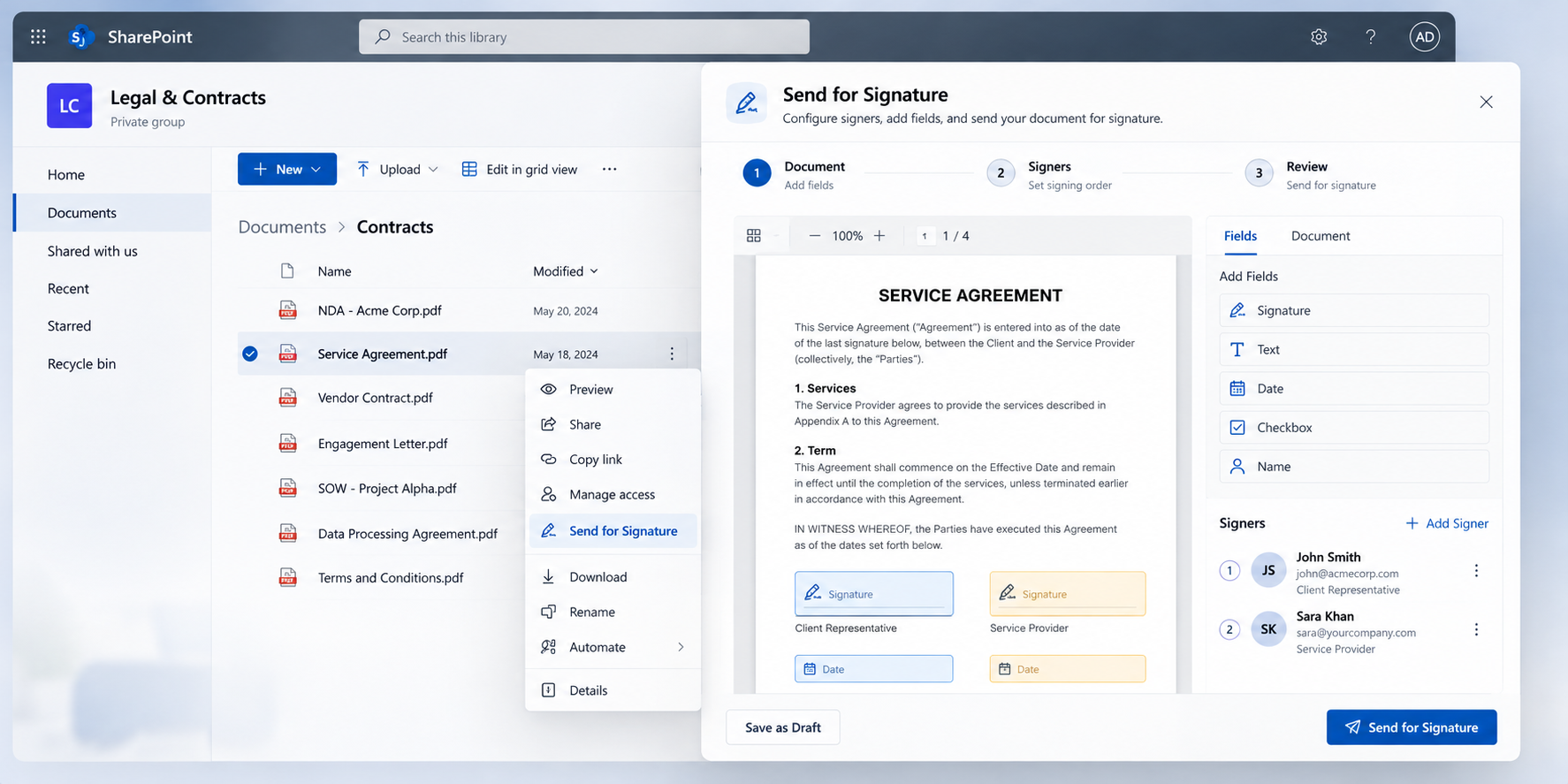
I built an e-signature workflow directly into SharePoint. Users can select a document from the library, open the signing interface, place and assign fields, configure the signing order, and send the document for signature — without moving the document to an external signing platform.
SharePoint Library→Signing System→Signed PDF
How It Works
01
The user selects a PDF from the SharePoint document library and starts Send for Signature.
02
Signature, text and date fields are placed on the document and assigned to specific signers and signing order.
03
Each signer receives a secure, time-limited signing link.
04
The signer opens the document and completes the assigned fields using the browser-based signing interface.
05
The captured signature is embedded into the PDF at the configured field position.
06
The completed document is saved back to the SharePoint library, with signing activity recorded for audit purposes.
Architecture
The solution combines a SharePoint-native frontend with an ASP.NET Core API for secure document access, signing workflow, PDF processing and audit operations.
Azure AD / Authentication
Microsoft Graph Notifications
Security & Compliance
Documents remain within the Microsoft 365 / SharePoint environment.
Signing tokens are encrypted and time-limited.
Signing links provide controlled access to the assigned document.
The next signer is activated only after the previous signer completes their step.
Signer email, IP address, timestamp and user-agent information are recorded.
Microsoft Graph and Azure AD integrate the workflow with the existing Microsoft 365 environment.
Technical Implementation
SPFx 1.20 · React 17 · TypeScript · Fluent UI · PnPjs · PDF.js · HTML Canvas · Axios
ASP.NET Core 8 · Entity Framework Core 8 · SQL Server · PdfSharpCore · REST API
SharePoint Online · Microsoft Graph · Azure AD · Azure.Identity
PDF.js · PdfSharpCore · OpenXML
Engineering Details
01
The browser-based PDF interface and PDF processing layer use different coordinate systems, requiring coordinate mapping to place signatures accurately on the generated document.
02
Each signer is activated only after the previous signer completes their step, with controlled signing tokens and Microsoft Graph notifications.
03
Encrypted and expiring signing links provide controlled access throughout the signing process.
The Outcome
Confidential documents remained within the Microsoft 365 environment while users gained a complete multi-signer signing workflow directly from SharePoint.
Documents remain within the Microsoft 365 environment.
Sequential signing supports multiple participants.
Signing activity is recorded with relevant signer and access information.
Users start the process directly from the SharePoint document library.
I build secure, production-ready systems around real business, compliance and technical constraints.